
前回でダンジョンの基本の描画はできたので、今回は更に描画範囲を広げて、よりダンジョンらしくしていこう。
描画範囲を広げるにしても、要は、基本の描画をfor文で回していけば良い。
using UnityEngine;

public class DungeonBuilder : MonoBehaviour
{
    public DungeonMap map;
    [SerializeField]GameObject wall;

    [SerializeField]int drawingSize;//初期位置の東西南北をどれくらい描画するか

    void Start()
    {
        map = new DungeonMap();

        Initial_Build();
    }

    private void Initial_Build()
    {
        //Playerの座標は奇数座標(2n+1)なので2毎でforを回す。
        for(int offsetX = - drawingSize * 2 ; offsetX <= drawingSize * 2 ; offsetX += 2)
        {
            for(int offsetY = - drawingSize * 2 ; offsetY <= drawingSize * 2 ; offsetY += 2)
            {
              Dungeon_Generator(1 + offsetX, 1 + offsetY);
            }
        }
    }

    private void Dungeon_Generator(int x, int y)
    {
        Check_And_Build(x, y+1, 90);//北壁
        Check_And_Build(x, y-1, 90);//南壁
        Check_And_Build(x+1, y, 0);//東壁
        Check_And_Build(x-1, y, 0);//西壁
    }

    private void Check_And_Build(int posX, int posY, int rotation)
    {
        int getMapchip = map.Get(posX, posY);
        switch (getMapchip)
        {
            case 0:
              break;

            case 1:
              GameObject obj=Instantiate(wall, new Vector3(posX, 0, posY), Quaternion.Euler(0, rotation, 0));

              break;

            default:
              break;
        }
    }
}
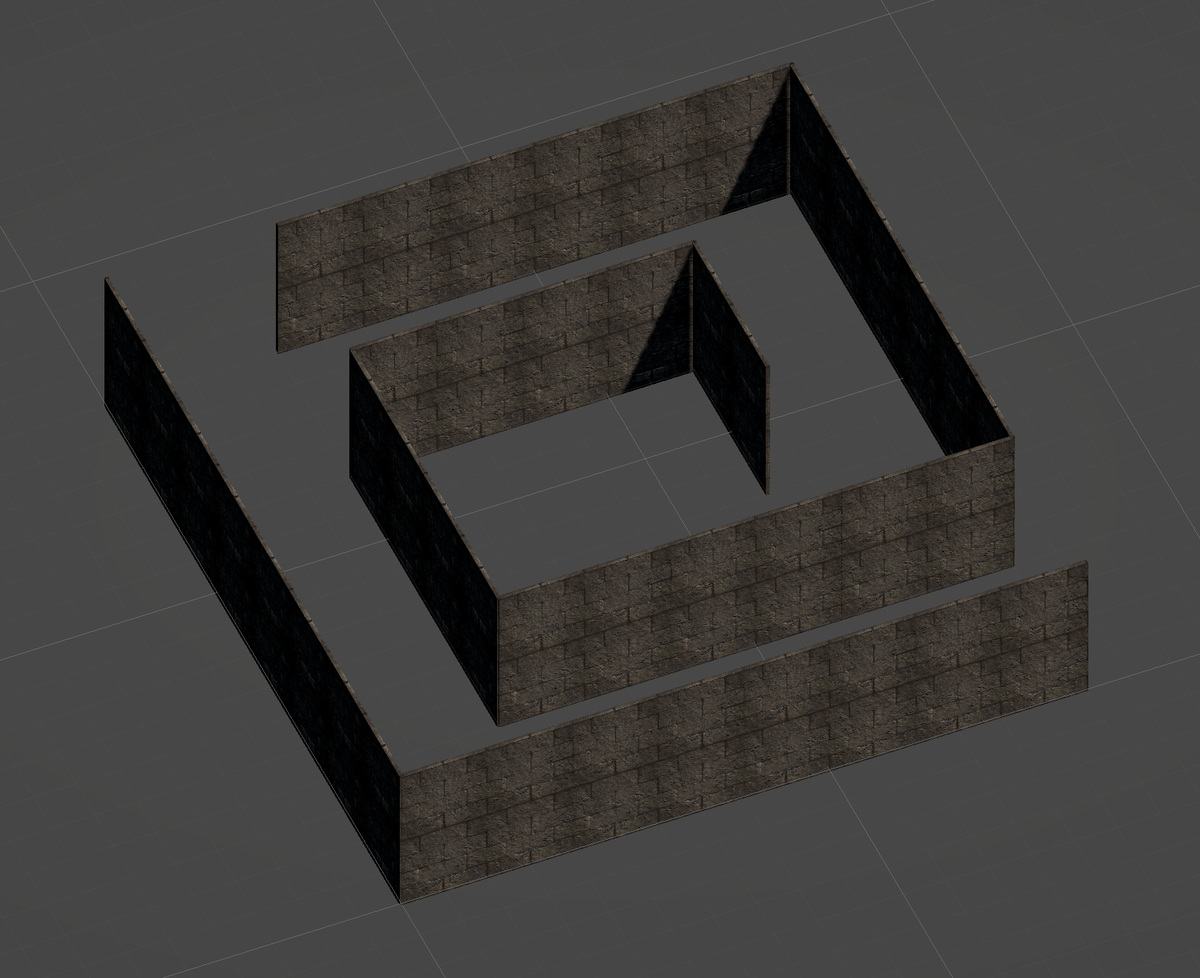
一見すると上手くいったように見えるけれど、実はこれでは後々で困ることになる。
というのも、連続して描画しているためにPlayer座標(1,3)の時に東壁として描画した(2,3)の壁と、Player座標(3,3)の時に西壁として描画した(2,3)の壁の様に、一箇所に壁を二重に描いてしまっている。
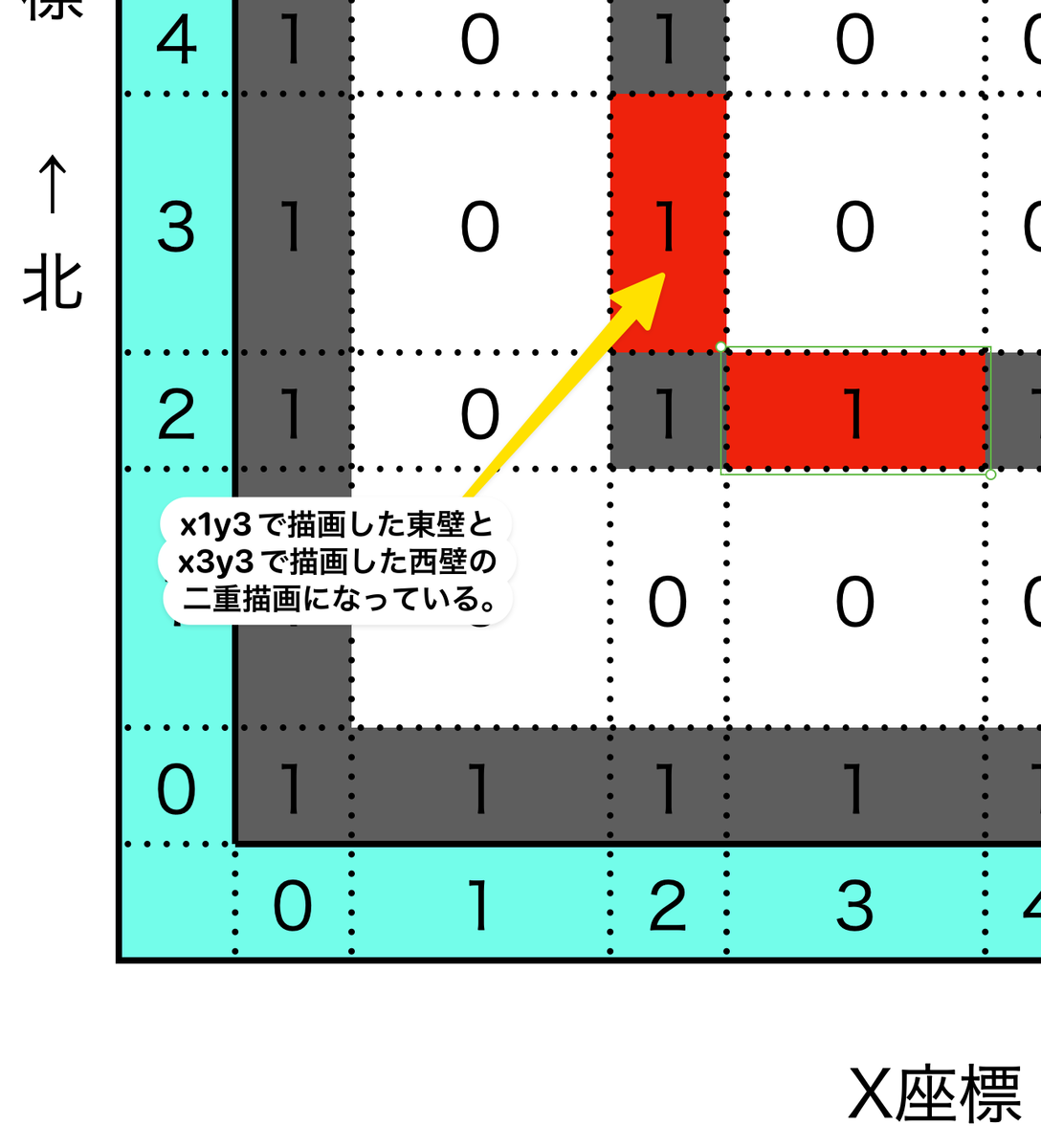
という事は、エリアを連続して描画するなら、東西のどちらかの一方向と、南北のどちらかの一方向。と二方向のみ描画すれば良いことになる。
    private void Dungeon_Generator(int x, int y)
    {
        Check_And_Build(x, y + 1, 90);//北壁
        Check_And_Build(x + 1, y, 0);//東壁
    }
この、x座標・y座標ともに奇数座標(2n+1,2n+1)と北壁の座標(2n+1,2n+1 +1)、東壁の座標(2n+1 +1,2n+1)の集団が今後の基本単位(グリッド)になる。
グリッド単位で描画する仕組みは決まったので、次はダンジョン内を歩けるようにして行く。
とりあえず壁の衝突判定は行わずに、まずは基本行動の移動と回転ができる様にするのだけれど
www.youtube.com
こんなありがたい動画のおかげで、基本的な作り方はできている。
あとはこれを、3Dダンジョンと今回のマップの設計に当てはめて修正していけば良い。
using System;
using UnityEngine;
using Cysharp.Threading.Tasks;

public class PlayerController : MonoBehaviour
{
    public InputSystem_Actions ISystem; //InputSystem用
    public GameManager gmanager; //GameManager用

    bool IsRotate = false;//回転中かどうかのフラグ
    bool IsWalk = false;//歩いているかどうかのフラグ

    private void Awake()
    {
        ISystem = new InputSystem_Actions();
        ISystem.Enable();

        playerDirection = Direction.North;
    }

    void Update()
    {
        Vector2 LeftDirction=ISystem.Player.Move.ReadValue<Vector2>();

        if(!IsRotate && !IsWalk)//移動中か回転中なら何もしない。
        {
            Rotation(LeftDirction.x);
            Walk(LeftDirction.y);
        }
    }

    void Walk(float y)
    {
        if(y > 0.4f)//遊びによる誤作動防止
        {
            Walking(
                transform.position +
                        new Vector3((int)Math.Round(transform.forward.x * 2), 0,
                        ((int)Math.Round(transform.forward.z * 2)))
            );
        }
        else if(y < -0.4f)//遊びによる誤作動防止
        {
            Walking(
                transform.position -
                        new Vector3((int)Math.Round(transform.forward.x * 2), 0,
                        ((int)Math.Round(transform.forward.z * 2)))
            );
        }
    }

    void Rotation(float x)
    {
        if (x > 0.4f)//遊びによる誤作動防止
        {
            Rotating(transform.right);
        }
        else if (x < -0.4f)//遊びによる誤作動防止
        {
            Rotating(transform.right * -1);
        }
    }

    async void Walking(Vector3 targetPosition)
    {
        IsWalk = true;

        while(Vector3.Distance(transform.position, targetPosition) > Mathf.Epsilon)
        {
            transform.position = Vector3.MoveTowards(transform.position, targetPosition, gmanager.PlayerSpeed * Time.deltaTime);
            await UniTask.Yield();
        }

        transform.position = new Vector3((int)targetPosition.x, 0, (int)targetPosition.z);
        IsWalk = false;
    }

    async void Rotating(Vector3 targetRotate)
    {
        IsRotate = true;

        while(Quaternion.Angle(transform.rotation, Quaternion.LookRotation(targetRotate)) > Mathf.Epsilon)
        {
            transform.rotation = Quaternion.RotateTowards(transform.rotation, Quaternion.LookRotation(targetRotate), gmanager.PlayerRotateSpeed *10 * Time.deltaTime);
            await UniTask.Yield();
        }

        transform.rotation = Quaternion.LookRotation(targetRotate);
        IsRotate = false;
    }
}
最初作成した時は、これと比較にならないほどの長さで、難解かつ複雑怪奇なコードを何日も掛けて書いたものだけど、今ならこんなにシンプル😁
さて、これで初期描画と移動までできる様になったので、次は、移動に沿って描画エリアを増やしていき、ダンジョン内を全部歩き回れるようにしよう。


